Dealing with Conflicting PowerShell Cmdlets

It’s been quite some time since my last post, I’ve had a lot of work on my plate and now I’m finally able to take a break and write a blog post! Before we start, I just want to wish you all a happy Pessach and hope you’re all well during this pandemic. Anyway, on to the blog post!
I work with virtual machines a lot, and PowerShell has been my go-to language for automation and data analyzing for the past few years (Mostly because it’s the first REAL language I actually became relatively proficient in). There are a lot of modules out there, and when it comes to virtualization, VMware and Microsoft, 2 giants in the field of virtualization, offer quite robust PowerShell modules for infrastructure management and monitoring. A few days ago I was trying to write a script that gathers information from an Hyper-V host and so I’ve been meaning to use Hyper-V’s Get-VM cmdlet a hefty amount of times. Something weird happened though. I have imported the Hyper-V module, and when I invoked Get-VM, I got the following error:

Huh, odd, Microsoft’s documentation doesn’t say anything about needing to connect to a remote server.
Wait a minute… The FullyQualifiedErrorId field states it’s from the PowerCLI module, what’s going on here? Well, turns out PowerShell won’t necessarily sound the alarm if there are conflicting cmdlets originating from different modules. So… Let’s check which module this cmdlet originates from:

Well, looks like it does originate from VMware’s PowerCLI module. I could simply invoke Remove-Module VMware* to remove all of the PowerCLI cmdlets but hey, what’s the fun in that? And besides, what if I want to write a script to interact with my ESXi AND Hyper-V servers in the same script? Will I just import and remove modules throughout the script to combat this? This seems like a very quirky, bad solution to implement, there has to be another way (and there is)!
Turns out PowerShell has this nifty syntax feature which allows you to address cmdlets in specific modules, in case they overlap, by specifying the module, followed by a backslash, and then the cmdlet itself. Not only that, but PowerShell ISE’s (And VS Code’s, as far as I know) autocompletion actually support this feature and will autocomplete or autocapitalize the command when you press tab! Check out the following comparison.
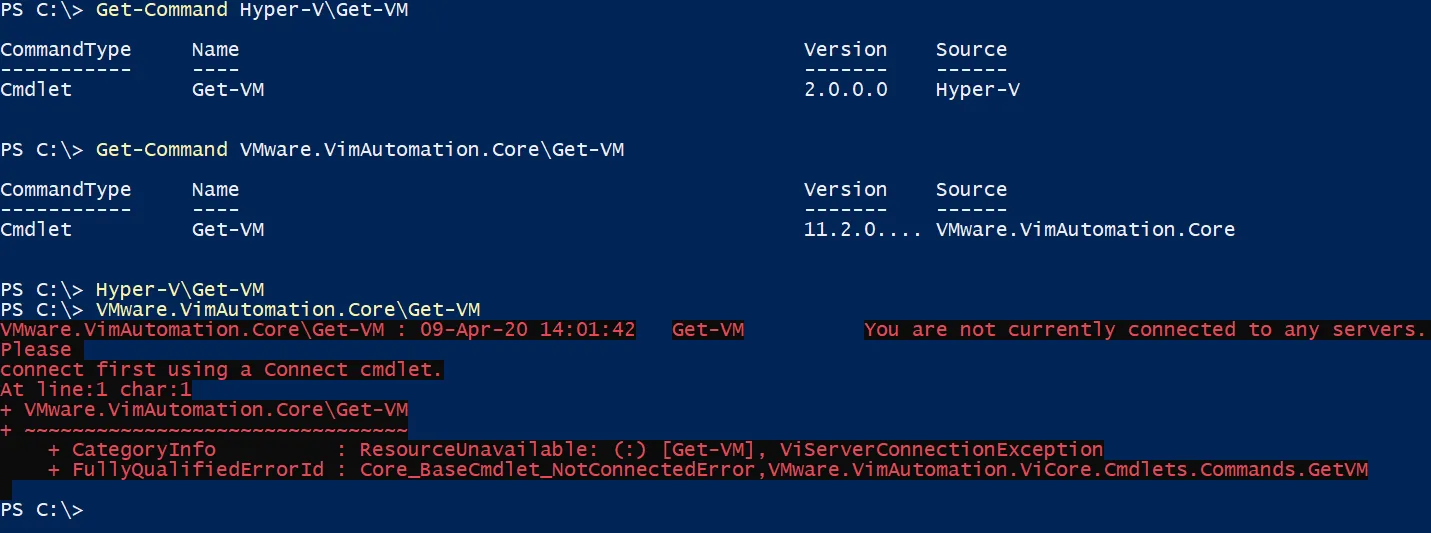
As you can see, this works! I don’t have any Hyper-V VMs on my computer and so the first command came out empty but the command went through.
I hope this was informative for you and will take your scripting skills up a notch.
- Category:
- Keywords:
