An Introduction to Kusto Query Language

Another day, another Azure post.
Logs are love, logs are life, and most of all, logs can be a real pain to manage, stream, store, parse and visualize. Lucky for us, Microsoft offers a host of products to handle log aggregation, management and querying. If you manage you logging within Azure, It’s time to get out of your shell.
Let’s talk about Kusto Query Language (or KQL, if you will).
What is KQL#
While the origins of the name “Kusto” (in the Microsoft context) remain a mystery,
Later edit: Thanks to Microsoft employee Rob Trent’s comment, we now know KQL is named after the undersea pioneer, Jacques Cousteau. You can read more about KQL in his series about it.
it’s important to know that Kusto is the former name of what is now called Azure Data Explorer. KQL is an open-source query language developed by Microsoft.
It’s one of the primary languages used in Azure Data Explorer, which is an Azure service used for big data storage and analytics, as well as being a solid foundation of Azure Log Analytics.
So yeah, about what KQL is - it’s a robust language used for data analytics. A Kusto query is a read-only request to take data, process it and return the results. With Kusto queries, we can summarize, visualize, and gather insights from our data.
Where can you practice KQL?#
Before we that the language itself, it’s important to know that there are 2 places Microsoft lets you practice KQL.
The first one is the Log Analytics Demo Environment and the second is the Sample Databases in Azure Data Explorer. There’s also a free course endorsed by Microsoft on Pluralsight.
How a Kusto query looks#
A Kusto query always starts with the data source in mind, so we specify the name of the table from with we want to query the data. We can then start filtering the data with where clauses, and then we can get down to the real deal and visualize the data. Let’s take a look at a sample query.
StormEvents
 | where StartTime >= datetime(2007-11-01) and StartTime < datetime(2007-12-01)
 | where State == "FLORIDA"
 | count
As we already know, a Kusto query starts with the name of the table from which we want to query the data. In this case, the table is called StormEvents, and contains information about storms in various states in the US. Pay attention to the pipelines at the beginning of every line (excluding the first line). These pass the data from one statement to another, just like in scripting.
So this query, in essence, is looking for storm events between November 11th and December 1st in the year 2007, in the state of Florida, and counts them. See why this language is so robust? It’s designed with humans in mind (mostly), some even go as far as to call it the PowerShell of query languages.
Let’s take a look at the result of this query:
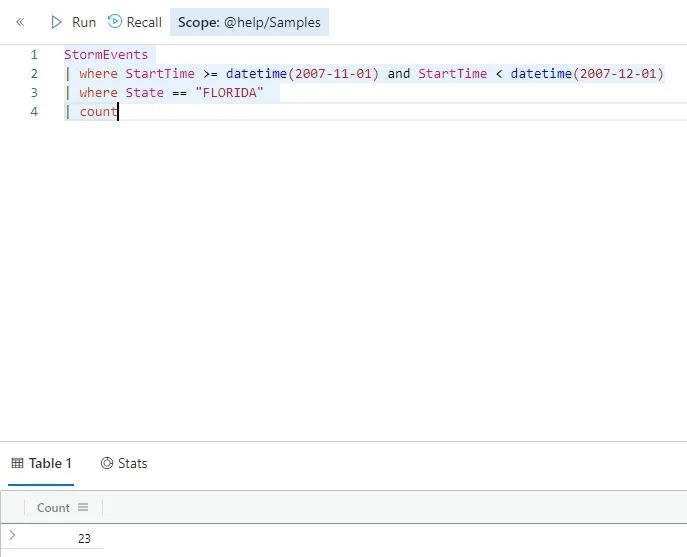
So we can see that during the timespan we specified, Florida had 23 storm-related events (oof). To be honest, this query isn’t a great example of how robust Kusto queries can be, but it’s simple enough to be begginer-friendly. Let’s run another query against this dataset and try to understand what it does.
StormEvents
| where StartTime >= datetime(2007-01-01) and StartTime < datetime(2008-01-01)
| summarize Count=count() by State
| where Count > 1500
| order by Count
| render columnchart
In this query, what we do is we say “Hey, get me all storm-related events in 2007, summarize by State (count how many events were in each state), return only the states in which there were more than 1500 events, sort by number of events and show as a column chart.
And… Voila!
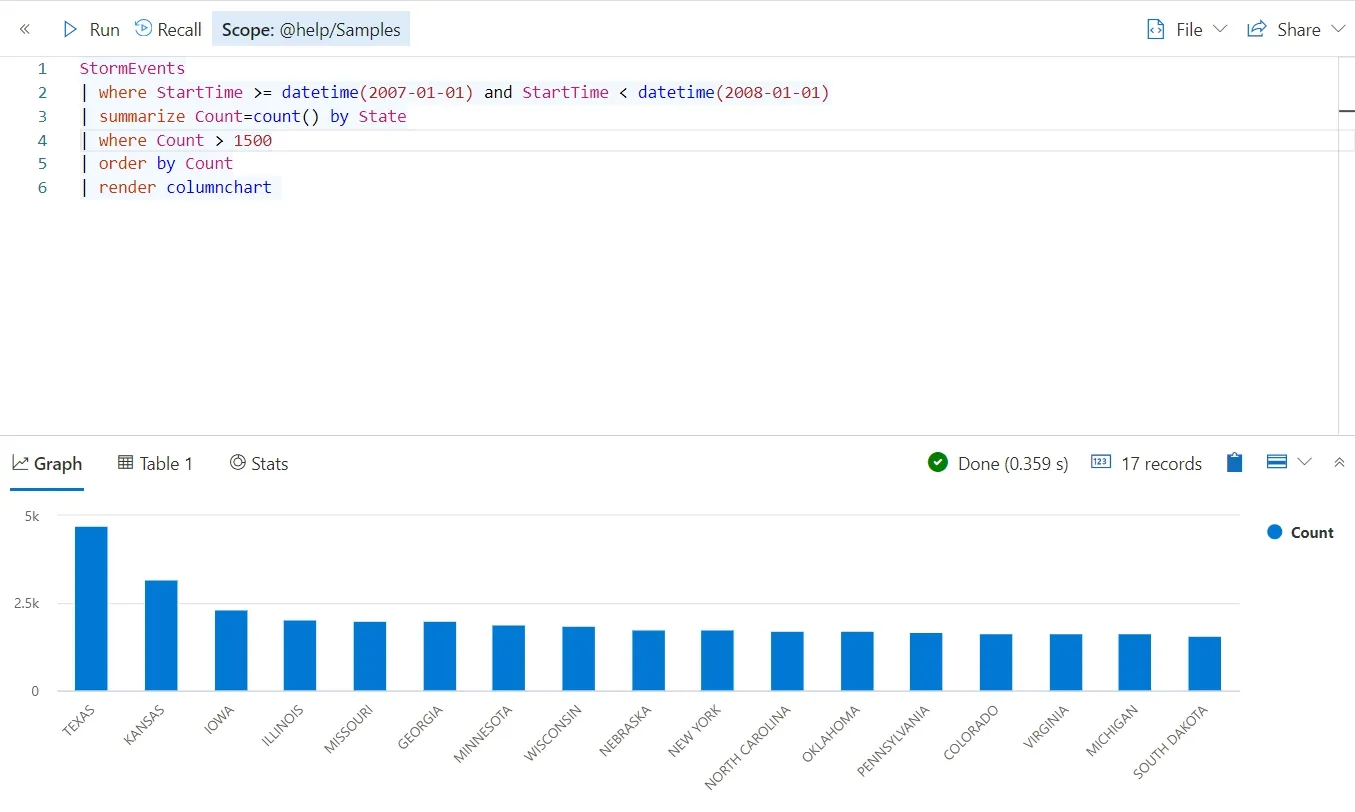
KQL is a great tool for data engineering. It can be applied to many different datasets with moduler, easy to read queries. Of course, this is only the tip on the iceberg. Kusto queries can be much more complex, but this is an introduction to the query language that might just be the new SQL.
